Home · Blog · article

How to build an OOH commercial proposal that closes the deal

Agencies receive 50 proposals a week. Direct advertisers receive 10. If yours doesn't show, in 30 seconds, where the screen is, who sees the ad, how much it costs, and what the location looks like — it goes in the trash.

· Hivestr · 55 views
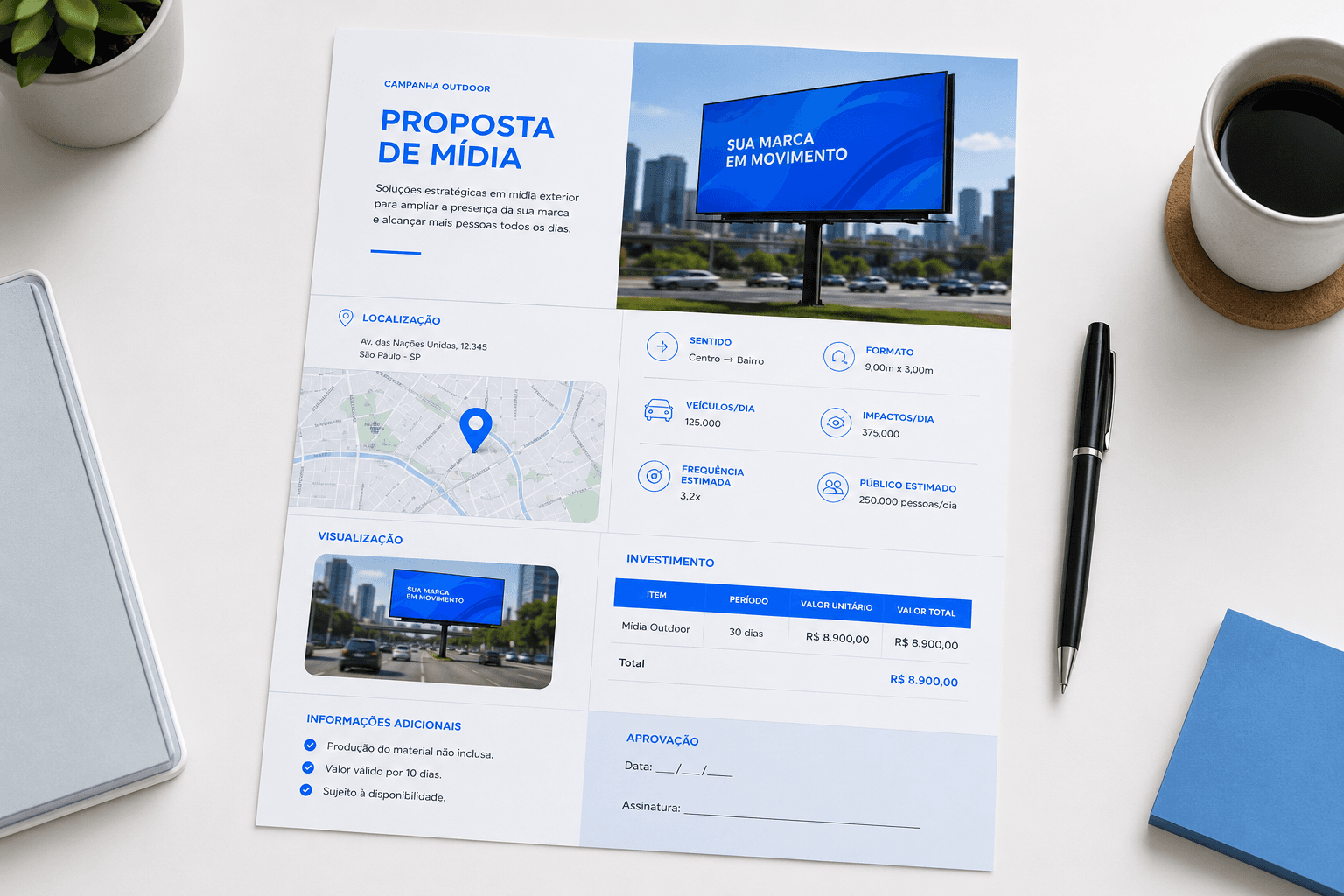
How to build an OOH commercial proposal that closes the deal

How to build an OOH commercial proposal that closes the deal

Agencies receive 50 proposals a week. Direct advertisers receive 10. If yours doesn't show, in 30 seconds, where the screen is, who sees the ad, how much it costs, and what the location looks like — it goes in the trash.

The commercial proposal is the moment when everything you've built — the inventory, the location, the audience — needs to translate into a buying decision. And most OOH operators lose the sale right here. Not because the inventory is bad. But because the proposal doesn't communicate the value.

The operator sends a voice message on WhatsApp with the price. Or a generic PDF with a list of addresses. Or an Excel table with no photos, no map, no CPM. The client looks at it, doesn't understand, doesn't get excited — and closes with the competitor who sent a visual, clear, and professional proposal.

This article teaches the complete anatomy of an OOH proposal that closes deals: what to include, in what order, how to present each element, and the mistakes that kill the sale before it begins.

What the client decides in the first 30 seconds

An OOH proposal isn't a legal document. It's a sales piece. And like every sales piece, it needs to answer four questions in under 30 seconds — or the client closes the PDF and forgets:

📍
Where is it?
Map with exact location of the screens. The client needs to visualize geographic coverage immediately. An address list doesn't work — a map does.
👥
Who sees it?
Audience data: estimated traffic, audience profile, peak hours. Even a conservative estimate is better than nothing. The client wants to know if their audience passes by.
🖼️
What does the location look like?
Real photo of the screen in its urban context: dimensions, visibility, surroundings. The client needs to see the location as it actually is — and a real photo does that in 1 second.
💰
How much does it cost?
Clear pricing with a defined period, calculated CPM, and payment terms. No ambiguity, no "starting at," no "contact us for pricing."

The proposal isn't about you. It's about the result the client will get. Every page that doesn't answer "why is this worth it for me?" is a page that gets in the way.

The 8 elements of a complete proposal

A professional OOH proposal has 8 blocks, in this order. Each one serves a specific function in the client's decision journey.

1
Professional cover
Your logo, company name, date, and a clear title ("Commercial Proposal — [Media Type] — [City/Region]"). The cover communicates professionalism before the client opens the first page. Clean visual, no clutter, no excess text.
2
Opportunity summary
3–5 lines about what you're offering: "We propose placement on [X screens] located in [region/city], with coverage of [estimated audience] impressions over [period]." Direct, no jargon, no company history. The client wants to know what they get, not who you are.
3
Coverage map
A visual map showing where the screens are located. Can be Google Maps with pins, a styled map, or a screenshot from your availability system. The client needs to see the geographic footprint at a glance. If you operate across multiple cities, show coverage per market.
4
Screen spec sheets
For each screen (or group): address, real photo of the location, media type (LED, billboard, elevator screen), dimensions, resolution (if digital), orientation, accepted creative formats, and audience data (estimated traffic, profile). The more visual, the better. Real photos are mandatory.
5
Real photo of the screen in context
A current photo of the screen in its real environment: the panel on the avenue with traffic, the screen in the elevator, the billboard on the highway. The client needs to see the location as it is — dimensions, visibility, surroundings, traffic flow. A real photo is what turns data into an emotional decision.
6
Investment and CPM
Clear table with: screens included, placement period (biweekly, monthly, quarterly), total value, value per screen, calculated CPM (if applicable). If you offer more than one option (smaller vs. larger package), present them as alternatives — not as an open negotiation.
7
Commercial terms
Payment terms, payment method (invoice, wire, etc.), creative submission deadline, installation timeline, and cancellation policy. Everything written, clear, no surprises. Agencies need this to issue a purchase order. Direct advertisers need it for internal approval.
8
CTA + direct contact
Last page: "To confirm, contact [Name] at [WhatsApp/email/phone]." Include proposal validity (7–15 days). A proposal without an expiration date is a proposal without urgency — and without urgency, the client postpones indefinitely.

The real photo is what sells

If there's a single element that separates the proposal that closes from the one that gets ignored, it's the real photo of the screen in context. The reason is neurological: the human brain processes images 60,000 times faster than text. When the client sees the panel on the real avenue, with the flow of cars, the urban surroundings, and the face dimensions, they're no longer evaluating a spec — they're imagining their campaign running there.

❌ No photo
"4x3m LED panel on Av. Paulista"
The client reads it, understands the dimensions intellectually, but feels nothing. It's information, not emotion. They move on to the next proposal.
✅ With real photo
Real photo of the panel on Av. Paulista, in urban context
The client sees the real screen, in the real environment, with the surrounding traffic flow. The reaction is immediate: "my brand needs to be there." The contextual photo turns specs into desire.

Real photos don't require a professional photographer. A phone with a decent camera, during daylight, shot from an angle that shows the screen in its urban context (with traffic, pedestrians, surroundings) is enough. Avoid flat, close-up shots that don't show scale. The client needs to see the screen the way the audience sees it: from a distance, in context, with the real dimension of visibility.

Advanced tip

For agencies, send the screen photos as separate image files alongside the proposal — the agency's media team uses those photos for internal approval with the advertiser. Making the agency's internal approval easier is making the sale easier.

The pricing section: how to present it without fear

The biggest mistake in the pricing section isn't charging too much. It's presenting it poorly. How the price is framed determines whether the client sees cost or sees investment.

What to include in the investment table

📋
Package description
Which screens are included, format (LED, billboard, elevator screen), and quantity. "3 LED panels 4x3m in São Paulo's South Zone" — not "Package A."
📅
Clear dates
Exact start and end dates. "Aug 1 to Aug 31, 2026" — not "1 month." If it's biweekly, specify: "Aug 1 to Aug 15 (1st biweek)."
💰
Total value + per-screen value
Show the total and break it down per screen. The client evaluates whether each individual screen is worth the investment. If the total is intimidating, the unit price anchors.
📊
Calculated CPM
If you have audience data, calculate the CPM and include it. "R$ 28 per thousand impressions" is more tangible than "R$ 8,000 per month." CPM enables comparison with other media — and OOH almost always wins.

The options strategy

Offer 2–3 options instead of one. Not as a disguised discount, but as genuinely different packages. Example: Essential Package (3 screens for 1 month), Impact Package (5 screens for 1 month), Domination Package (5 screens for 3 months with a commitment discount). Three options make the client compare your options — instead of comparing you with a competitor.

Never do this

"Contact us for pricing," "price upon request," "starting at R$..." If the client needs to call you to find out the price, they won't call — they'll move to the next proposal. The price needs to be in the proposal. Always.

The 7 mistakes that kill the proposal before it's read

1
Sending it as a voice message
A voice message isn't a proposal — it's a conversation. The client can't forward a voice note to their partner for approval. Can't print it. Can't compare it with another proposal. Voice is for aligning. A proposal is a document.
2
No photo of the screen
An address without a photo is an abstraction. The client won't open Google Street View to check. If you don't show what the location looks like, it doesn't exist in the client's mind.
3
Generic one-size-fits-all proposal
The same proposal you sent to the clinic went to the car dealership, the restaurant, and the agency. No context, no relevance. The client notices — and discards.
4
10 pages about your company's history
The client doesn't want to know you were founded in 2015, that your mission is "transforming visual communication," or that you value "excellence and innovation." They want to know where it is, who sees it, what it looks like, and how much it costs. Cut everything that doesn't answer those questions.
5
No expiration date
A proposal without an expiration is an eternal proposal — and what's eternal isn't urgent. "Valid until August 25, 2026" creates a sense of time. The client knows they need to decide.
6
Format that won't open on mobile
The client will open the proposal on their phone, in the car, between meetings. If it's a heavy PPTX or a poorly formatted PDF that won't load, they won't open it. Lightweight PDF, responsive layout, or an online viewing link is the standard.
7
No follow-up
A proposal sent without follow-up dies in 72 hours. The client forgets, the inbox buries it, the urgency passes. Call or message 48 hours later: "Did you receive the proposal? Can I clarify anything?" Follow-up isn't pushy — it's professional.

How to send it: format, timing, and follow-up

📄
Format: lightweight PDF or link
PDF under 5MB or an online viewing link. Never PPTX, never DOCX, never ZIP. The client needs to open it in 1 click, on any device.
⏰
Timing: same day as the conversation
If the client asked for a proposal on Monday, send it Monday — or Tuesday morning at the latest. Every day of delay is a day the interest cools and the competitor sends theirs.
📱
Channel: email + messaging
Send by email (formal record) and notify via messaging ("Just sent the proposal by email, take a look"). Two channels ensure the client sees it.
🔄
Follow-up: 48h, 5 days, 10 days
48h: "Did you receive it? Can I clarify anything?" 5 days: "We have availability for the period, but need confirmation by [date]." 10 days: "I've held the screens until [date]. If not confirmed, I'll release them." Real urgency, not artificial.

The proposal as a competitive advantage

In a market where most operators send voice messages, Excel spreadsheets, or generic PDFs, a professional proposal with real photos, maps, CPM, and clear terms isn't just a sales tool — it's a competitive advantage. The client compares your proposal with the competitor's. If yours is visual, clear, and well-structured, and the competitor's is a wall of text on WhatsApp, you've already won before negotiating price.

A professional proposal also communicates something beyond inventory: it signals that your operation is organized, that you have processes, that you'll deliver what you promise. The proposal is your company's most powerful business card — because it arrives in the client's hands at the exact moment they're deciding who to spend money with.

You don't lose the sale on price. You lose it on presentation. The operator who sends the best proposal — not the cheapest — closes more deals.

The system that generates proposals in minutes

Building professional proposals manually works for 2–3 a week. But when the pipeline grows — 10, 15 proposals a week — the bottleneck appears. The salesperson spends 1–2 hours building each proposal instead of prospecting. The owner reviews each one because they don't trust the quality. The screen photo is outdated. The price is wrong because the rate card changed and nobody updated the template.

A specialized OOH ERP solves this because the data is already there: the screen with real photo, coordinates, and audience data; the updated rate card; the real-time availability map. The proposal comes out of the system in minutes, with screen photos, calculated CPM, and a professional layout — no designer needed, no copy-pasting from old templates, no risk of errors.

Hivestr

Professional proposals in minutes. Not hours.

Hivestr is the ERP, CRM, and marketplace built exclusively for OOH, DOOH, TV, and radio operators. Generate proposals with maps, real screen photos, calculated CPM, and a standardized layout — straight from the system, no manual templates. Your salesperson builds in 5 minutes what used to take 2 hours.

Start free for 7 days →

Your media company's whole operation

Inventory, proposals with online approval, CRM, campaigns, proof of posting and finance in one account. 7 days free to try.

Subscribe to the Hivestr newsletter

Get tips, OOH/DOOH industry news, and Hivestr content straight to your inbox.

No spam. Just tips, industry news, and Hivestr content. Unsubscribe anytime.

← Back to Blog